
Multipass
In the Multipass section of the app, at the bottom of the map, you'll find all the passes you've purchased. They're shown in a horizontal card list and are organized by license plate and parking.
This means that:
- On each card you'll see all available passes linked to the same license plate and the same parking.
- If you have Multipass for two different vehicles in the same parking, you'll see a different card for each license plate.
Example:
If for the same parking and license plate you buy a Multipass 5 and later a Multipass 10, the app will show a total of 15 available passes for that parking and that license plate.
Pass status
- When you have available passes that haven't expired, they'll appear as "Available" in green.
- When you don't have available passes (due to use, expiry or license plate change) they'll appear as "Not available" and will remain visible in the app for 3 months, for informational purposes only.
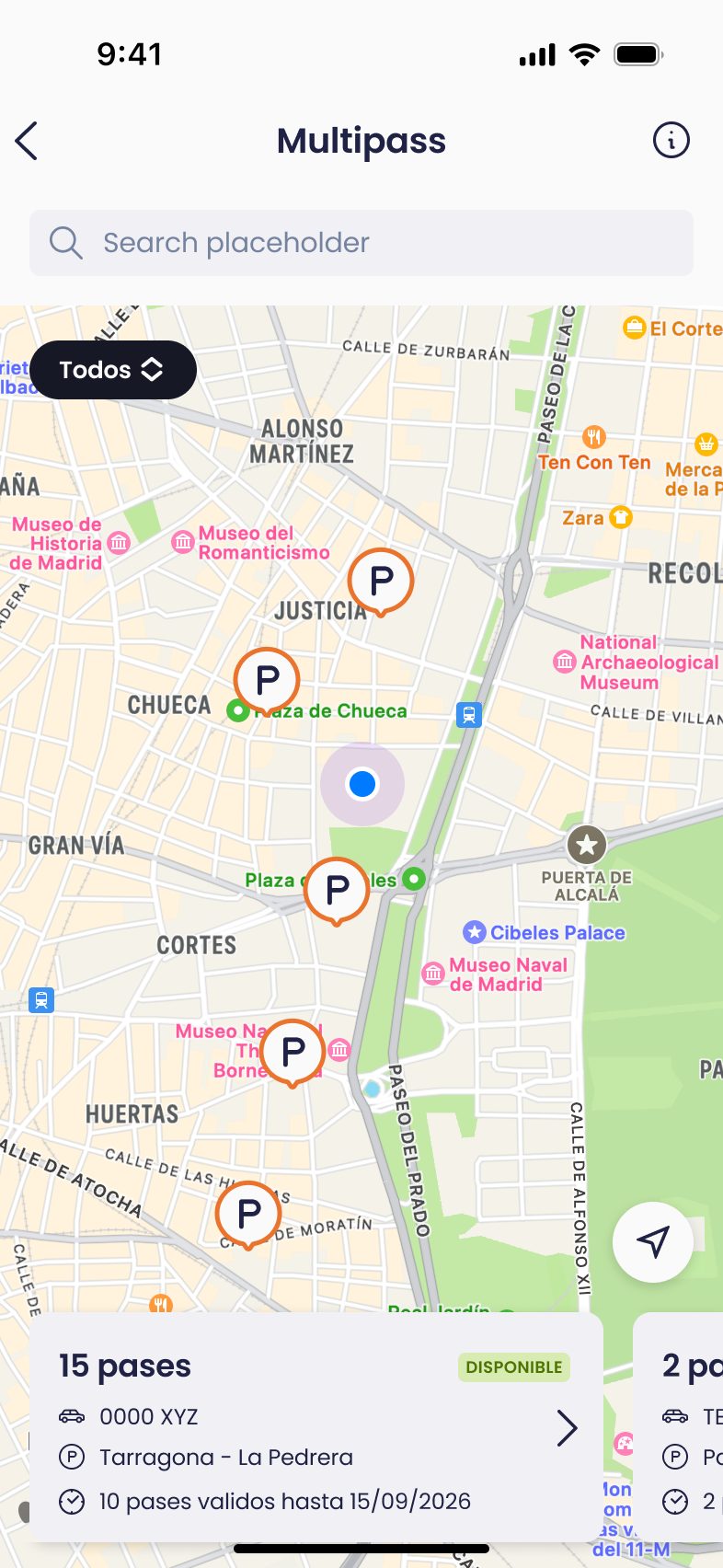
On each Multipass card you'll also see information about whether any of your passes is about to expire.
Keep in mind that passes have a validity of one year from the purchase date and that the ones expiring sooner are always used first.
Your pass details
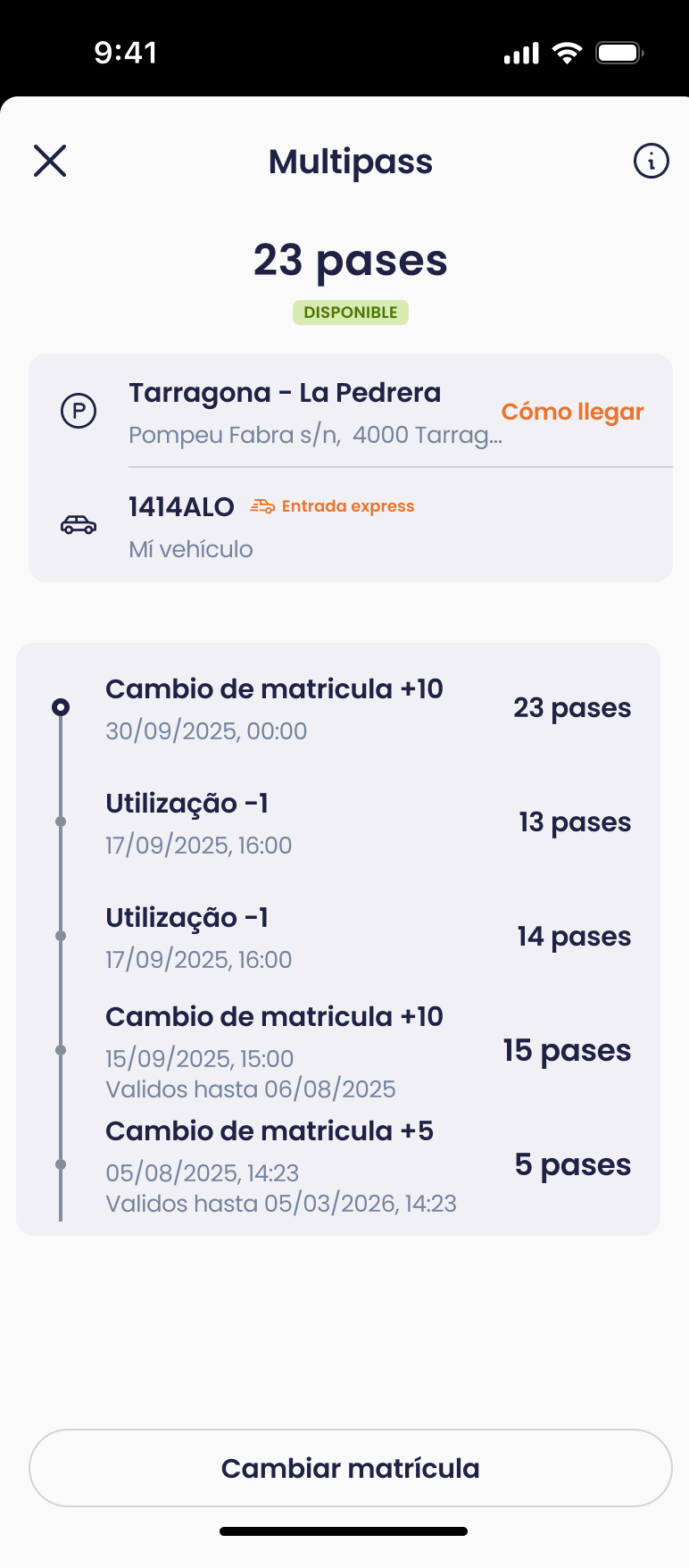
By tapping on a Multipass card you'll access the details screen, where you can check:
- The parking where the Multipass can be used
- The license plate it's assigned to.
- A history of movements with information about:
- When you bought the Multipass
- When the passes expire
- Use of the passes
- License plate changes made
From this same screen you can also change the license plate and assign the passes to another vehicle easily.
If you change the license plate assigned to your passes, a new card will be created for that parking with the new license plate (if it didn't exist previously).
The previous card will remain visible in the app, but will appear with no available passes (zero passes), for informational purposes only.
Are you tired of looking for a parking space near your home or work? Do you usually park in the same car park? Discover Multipass! 😉
Multipass is the perfect product for parking in your favourite car park whenever you want, up to 12 hours per pass, without having to set the date beforehand, and at the best price. Save up to 85% on the car park’s pay-as-you-go rate.
You can buy your Multipass with 5, 10 or 20 passes through the Telpark app. The discount will vary depending upon the car park and the number of passes you take out.
How do I buy my Multipass? It’s very easy!
1. Open the app and click on the “Multipass” section.
2. Next, find the car park in which you want to buy your Multipass.
3. Select the number of passes in your Multipass (starting from 5 passes).
4. Select the vehicle you will use with your Multipass.
5. Check your details and confirm your purchase.
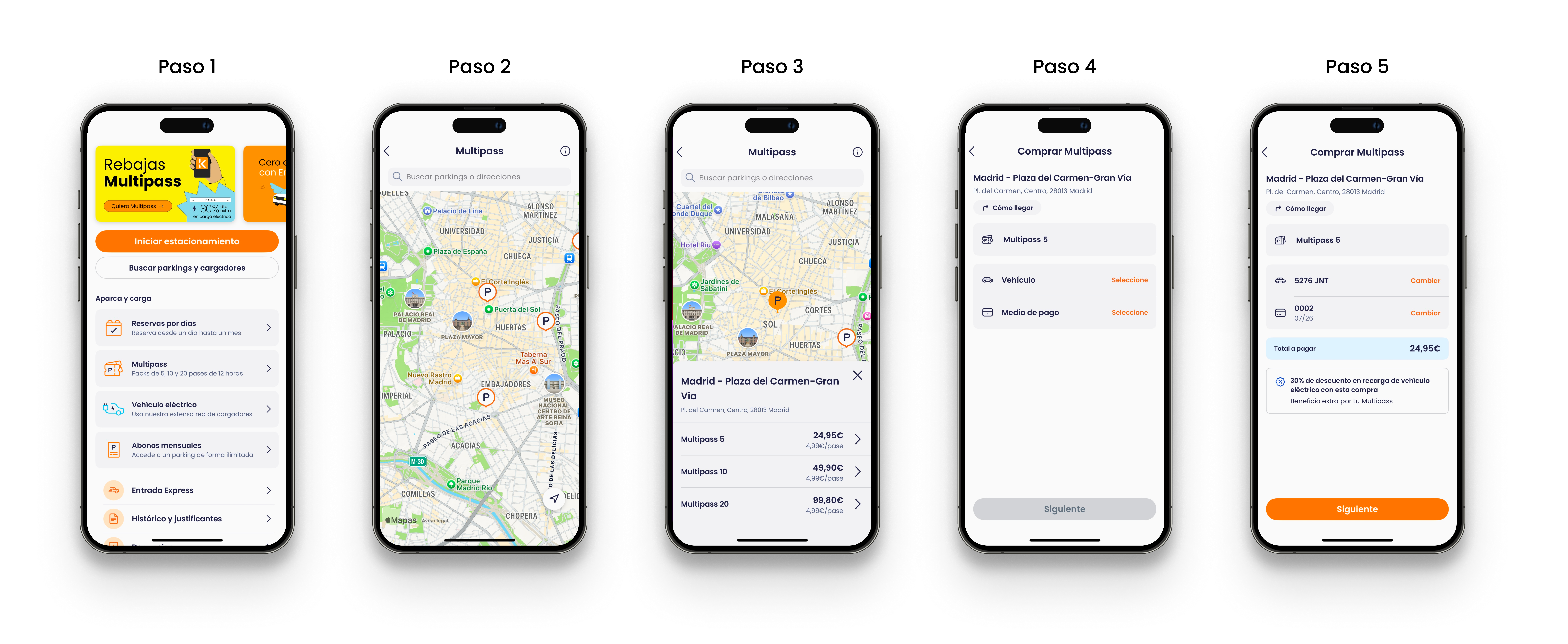
And you’re done! You can see your active passes in your Multipass section. In the details section, you will find the address of your car park and the number plate associated with your Multipass.
Terms and conditions:
- A pass is valid for 12 hours after you enter the car park.
- After those 12 hours, if the user has Express Entry activated, the extra stay will be automatically charged to the specified credit or debit card. If Express Entry is not activated, the user must pay the full stay at the pay station or booth according to the current rotation rates at the chosen car park, which are available on-site.
- A single entry to and exit from the car park per pass.
- Each Multipass is valid only for the car park selected during the purchase process.
- The User may change the license plate associated with the Multipass at any time; however, only one vehicle may be active at the same time. In the event of simultaneous use with multiple vehicles, additional charges may apply.
- Product can only be purchased on the Telpark app.
- Expires 1 year after the time of purchase.
- VAT included in the price.
Still have questions? Don't worry. Contact us, we'll be more than happy to help.