
Account access
Don’t worry! Contact us and tell us the e-mail address you are trying to activate so that our technicians can find out what has happened and help you activate it.
Still have questions? Don't worry. Contact us, we'll be more than happy to help.
You can create an account or login in two ways: directly on your mobile device or through our website. The process is similar.
Create an account
You can access telpark via the website, or via the application itself. When logging in from either option, you will need to register under "Create an account" by entering your email address and a password. Once you have completed the registration process you will receive an email and you will be able to enjoy telpark without any problems.
How to log in
To login, simply use the same details you used to create an account. You will have to insert them again in the application or website and log in. In case you don't remember your password, click here and find out how to recover it.
Still have questions? Don't worry. Contact us, we'll be more than happy to help.
Don’t worry! Contact us and tell us the email you currently use with Telpark. Our technicians will resolve it as soon as possible.
Still have questions? Don't worry. Contact us, we'll be more than happy to help.
There are two ways to change your password: if you know it, you can change it directly in the app; if you don't remember it, you will have to retrieve it.
Change password
To change your password, go to More Options - Account - Change password, where you will have to enter your current password and then your new password.

Recover password
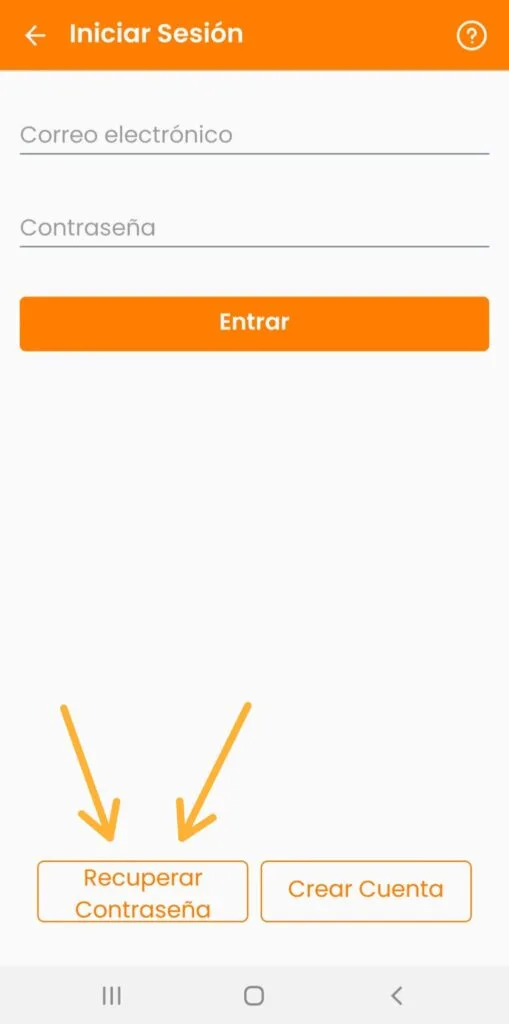
On the main screen, click on Recover password, where you will then have to enter your email address and click on Recover. We will then send you an email to reset your password.
Still have questions? Don't worry. Contact us, we'll be more than happy to help.